Getting and Installing Timidity and Basic Links
Timidity at Sourceforge
Timidity Windows Binaries
Windows Binary at Parnasse
Scala Homepage
Free Piano Soundfont - Fazioli Concert Grand
Free Piano Soundfont - Steinway Model C
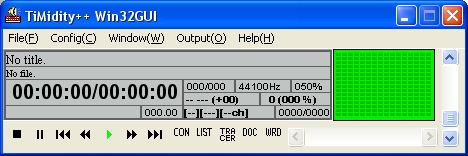
This document will focus chiefly on solving problems I encountered with the Windows implementation of Timidity, but most of the information will be usable across Linux and other platforms. After running the windows installer you'll end up with a directory, somewhere, with a Timidity CFG file. This file is the way you tell Timidity what soundfont to use and it is a bit particular in how that is expressed.
First though I had to decompress those 2 piano soundfonts. This turned out to be a pain in itself. I was only successful with a shareware program, SynthFont. And that even was problematic. Download, and install SynthFont and then under the File menu item use Select Default Soundfont. A lot of great SoundFonts use a compression scheme, particular to the SoundFont community - the sfArk file format. Both of the piano SoundFonts I wanted to use, relied on that deployment mechanism. Once you have your sfArk file selected, use the Setup button, at the top of the app's toolbar and select - Retain sfArk-extracted Sf2 files for later use. It will leave the decompressed SF2 file that Timidity can read in the same directory.
Now back to Timidity. Here's my complete CFG file which resides in C:\WINDOWS\TIMIDITY.CFG.
soundfont "C:\\Program Files\\Timidity++ Project\\Timidity++\\SteinwayGrandPiano1.2.sf2"
It has one entry, soundfont and a path to that SF2 file. You can edit it through the Timidity Config(C) menu item, Preferences.
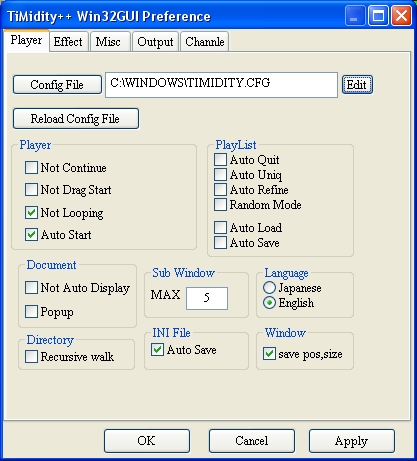
Be aware that it does not seem to appreciate spaces in the SoundFont name and that I also had to escape the path listing with 2 "\\" per directory.
Realizing Audio
Open up the Console window using menu item Window(W) and then Console(C) to see error output and to confirm its finding your SoundFont.
The menu item, Output(O) is where you configure how Timidity will produce audio, either as compiled directly to an audio file such as a WAV file or direct to your Windows audio device. I have two soundcards, and the Timidity output menu item, has one Windows Audio Driver selection, which never produced audio output, so I had to rely on WAV output RIFF WAV OUTPUT to hear my realizations. Select either one to get started.
Go to File(F) and Open File(F) to load a MIDI file. Hitting the tiny play button on the bottom of the app will start audio output, either directly to a file as I configured it or to your speakers.
Tuning Your MIDI File - How Microtonal Settings are Set
There are two ways to get Timidity to accept tunings, either through giving Timidity a MIDI Tuning Dump SYSX chunk or through the -Z argument and a file which is expected to be a column of 127 frequencies expressed as cents. I couldn't get the latter method to work yet, so I used Scala to 'retune' my MIDI file. This is not a tutorial on running Scala, it's fairly well documented. I basically created a 19ET scale, saved it and then used it to retune my MIDI files through the menuitem under Tools/Retune MIDI File. I then loaded Timidity with that MIDI file and voila, the expected excellently rendered piano prelude output. Here's my 19ET Scale file:
! C:\Scala22\19ET.scl

!

19 ET

 19

!

 63.15789

 126.31579

 189.47368

 252.63158

 315.78947

 378.94737

 442.10526

 505.26316

 568.42105

 631.57895

 694.73684

 757.89474

 821.05263

 884.21053

 947.36842

 1010.52632

 1073.68421

 1136.84211

 2/1
Here is the 'retuned' MIDI files for my Prelude 3: Prelude 3 MIDI 19ET Tuned
I have not been able to successfully use the latter method, using the -Z argument to a command line run timidity. Timidity can be run, as just implied, like Csound as a app from within DOS or another shell, and by giving it arguments, it produces the same output.
The command line I used was this:
./timidity -Z freq19.txt -Ow -oprelude3-19ET.wav prelude3-19ET.mid
This produced some obviously re-tuned audio, but not using the scale as expected. Since I have the MIDI Tuning Dump method working, I'll probably not investigate this methodology further.
Thanks to Graham Breed for the example:
# mean-tone tuning (in A minor)
8278
8587
9236
9581
10305
11083
11497
12366
12828
Here's a Perl script for generating such a column of data appropriate for an equal-tempered tuning:
print "# equal temperament\n";

foreach $i (0..127) {

$f = (440 * (2.0 **( ($i - 69) / 12.0)) * 1000 + 0.5);

print int($f), "\n";

}